
Market share of companies as promulgated by Tijori finance is required.
3 Likes
Amazing website loved it 
3 Likes
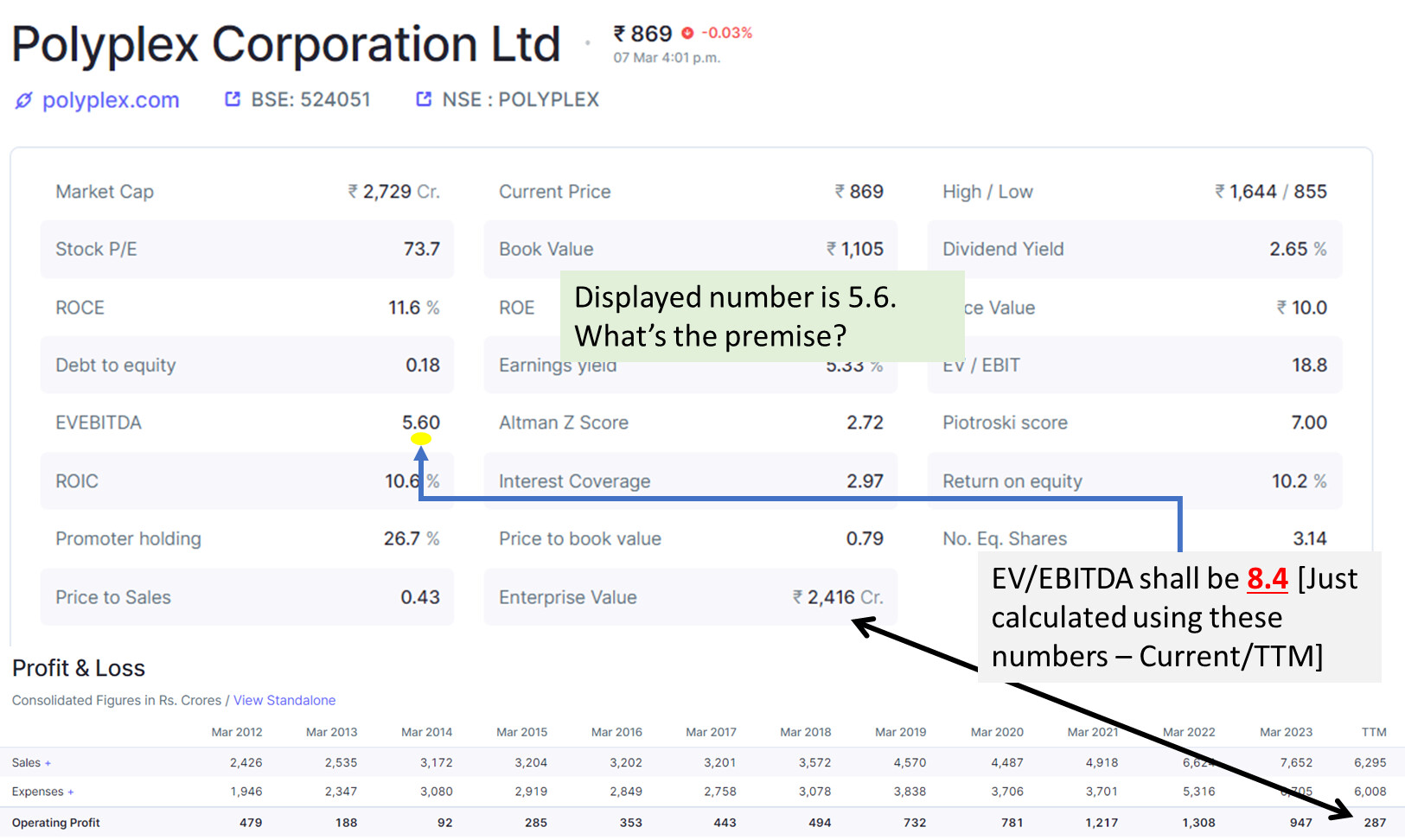
The Formula that we use to calculate the EVEBITDA is Enterprise Value/ (EBIT+Depreciation)
In the case of Polyplex Corporation, The enterprise value is 2355 Crs the EBIT is 129 Crs and the Depreciation is 303 Crs.Thus, the EVEBITDA is 2355/ (129+303) = 5.5
You can verify our numbers easily with available EBIT and Depreciation ratios.
1 Like
Thanks for revert.
My thinking was/is that EBITDA implies ‘Operating Profit’ while calculating EVEBITDA. However, screener’s logic considers EBITDA as ‘Operating Profit + Other Income’.
Since, the numerator (EV) is net of Cash. Don’t you think that denominator (EBITDA) shall also exclude Other Income (Cash/Investments are major sources usually)?
Different valuation Matrix are used by valuators, the commonly accepted perception is as follows: by excluding other income from the EBITDA denominator, a more accurate reflection of a company’s core operating performance is obtained, aligning with the principle of valuing a company based on its operational efficiency rather than including non-operating items.
Please note, other income may be important in other analyses, such as finding a company’s overall profitability or cash flow generation.
1 Like
Most of you disagree with me, that I never relied upon a single stock screener different screener use different method of calculation, cross check data with other screener also,
Where as self calculation is best when you locked in on company and about to put a buy order it seems tough initially, but practice makes it easy.
Hard learnt lessons take it with pinch of salt.
1 Like
Hi Sir, You can create a custom ratio to exclude Other Income. The formula would be (Enterprise Value/Operating Profit + Depreciation)
Thanks for the effort. I understood your POV.
Sir, Please I want a feature on screener.in to allow me to make number of companies name blacklisted so that in my screening results I’ll not see same companies almost in 100s again and again. This will save my time a lot. I keep on removing same companies name from my list 
1 Like
Hi,
When are we going to get it?
Thanks,
1 Like
Most of the metrics, ratios are not provided with i button (i button indicating what is the meaning of that matrix, how it is calculated, like in tickertape, tijori, stockedge) in Screener please do that.
4 Likes
And also the calculation Parameters applied need to be Indicated.
@ayushmit @pratyushmittal @Donald sir, is it possible for screener.in crew to look at peers (stock edge) and inculcate the same in here, because gap is widening between in terms of quality.
3 Likes
Sir, I am asking
Market Revenue of a particular company/Total Market revenue?
When we can see that in screener
1 Like
With due respect to SCREENER team,
please move abreast to other players in the field. Tijori, Ticker and Stock edge are providing better output.
4 Likes
In screener, Whenever giving information about a company which is first section, please don’t copy paste info given in DRHP, please analyse the things in-hand before posting there.
3 Likes
This part of the screen is user driven. If you notice a discrepancy, you can click on “Request an update” and submit missing information or point out errors for the Screener Team to review and take corrective action.
3 Likes
Hello, can someone tell me how to create an alert for bonus / stock split filings on screener.in?
@kowshick_kk can you please help? Thanks.
Sir, Creating an alert for bonus or stock split filings on Screener.in involves setting up specific criteria to notify you when such events occur. Here’s how you can do it:
-
Sign in: Log in to your Screener.in account.
-
Set up a Screen: Go to the “Screeners” section and create a new screen or choose an existing one.
-
Define Criteria: Define the criteria for bonus or stock split filings. You can do this by selecting relevant parameters like bonus ratio, stock split ratio, etc. For example, you might set a condition like “Bonus Ratio > 0” or “Stock Split Ratio > 1:1”.
-
Save the Screen: Once you’ve set up the criteria, save the screen with a recognizable name.
-
Activate Alerts: Look for an option to set up alerts within the screen or profile settings. Configure the alert settings to notify you via email or any preferred method when the criteria are met.
-
Test the Alert: Before relying on the alert system, test it to ensure you receive notifications properly.
-
Monitor: Keep an eye on your alerts and adjust the criteria if needed to ensure you capture the relevant bonus or stock split filings.
By following these steps, you should be able to create alerts for bonus or stock split filings on Screener.in.
2 Likes
Thank you @R_Sawkar. I will check this out on screener.