[TOOL LAUNCH] Free Chrome Extension — Turn Screener.in Data into Institutional-Grade AI Research Prompts | Zero Data Collection | v2.0.0 (US Stocks + Forensic Analysis) Under Review

@gaurav_aggarwal1 — done! :mouse_trap:

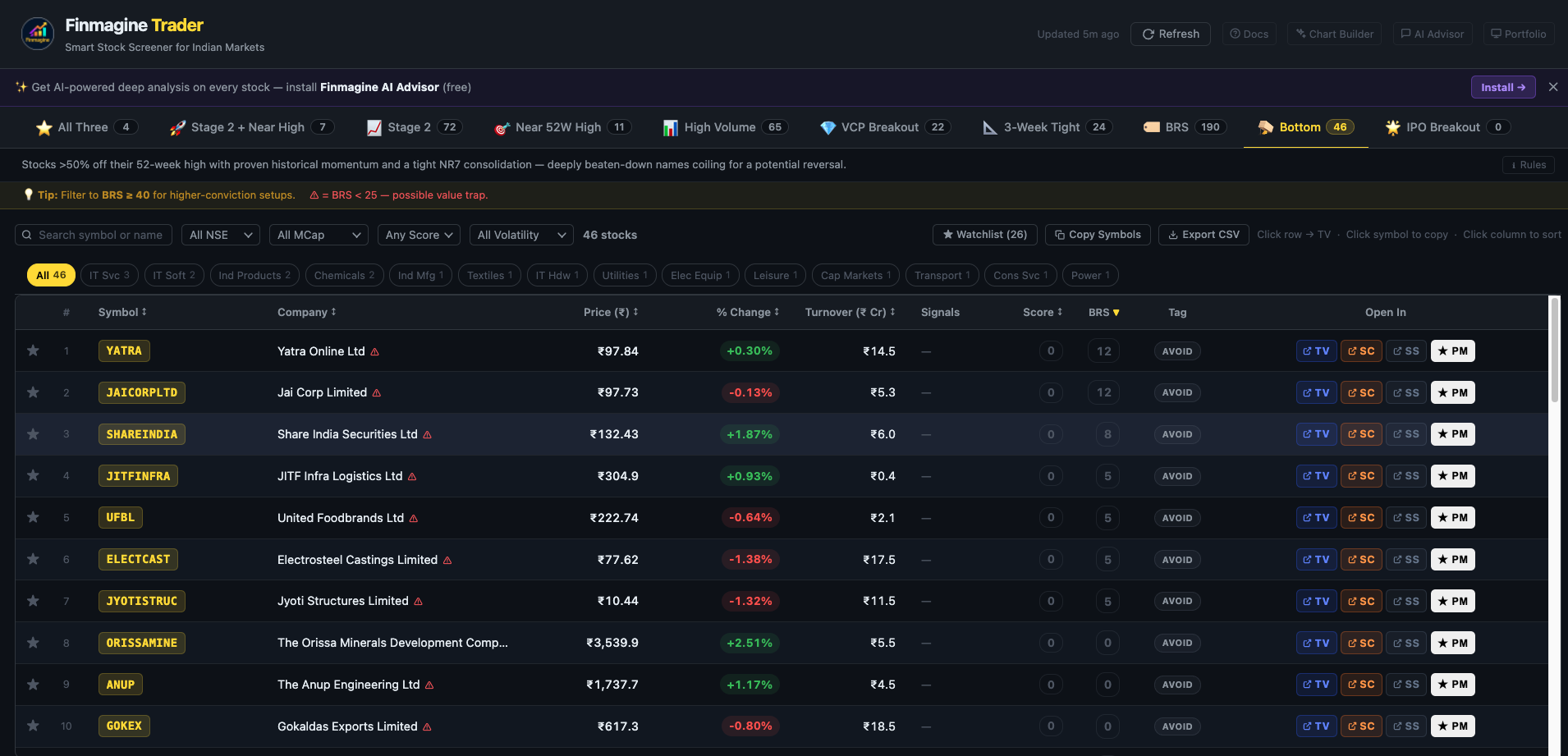
The Bottom tab is live in Finmagine Trader v2.1.0, submitted to Chrome Web Store today. Should be approved and auto-updated within a week or two.

What’s in it:

  • Your full BOTTOM scanner clause — 50%+ off 52W high, proven explosive momentum history, NR7 consolidation today or yesterday, ADR >3%, MCap >₹500 Cr, tight day (±3% change)
  • BRS score shown prominently for every result — so you can immediately separate genuine reversal candidates from value traps
  • Stocks with BRS < 25 get a :warning: warning badge — a quick visual flag for the higher-risk names
  • A tip bar at the top of the tab recommends filtering to BRS ≥ 40 for higher-conviction setups

One thing to note: You’ll see ~46 stocks vs the ~84 on Chartink’s native interface. The difference is that Chartink’s ADR% indicator uses a 14-day average internally, which we can’t replicate exactly via the API — we approximate with the single-day range, which is slightly more conservative. Same quality intent, just a tighter filter.

Thanks for sharing the screener — it’s a great addition to the toolkit.

1 Like

@Chandan_Kharbanda — good catch, and your diagnosis was exactly right.

The panel builds the prompt context when the page loads — at that point the gated Insights section hasn’t been revealed yet, so it gets missed.

Fixed and ready to go in v2.16.0. Submission is queued — will go in for submission the moment the current v2.15.0 review clears the Google approval process. Once it ships: unlock the Insight as you normally would, the panel detects the new content automatically and refreshes in the background. The next prompt you generate will include it — no reload, no extra clicks required.

1 Like

Please remove ADR% so that we can evaluate stocks purely based on the BRS score.

SIR CHECK OUT MY MARKET BREADTH DATA Atlas market breADTH

If all the following conditions are satisfied, then build a long position:

  • ARS value is positive

  • SRS value is positive

  • 52-week high is greater than 5 (indicating a strong bull run)

  • MARS 50 is positive

If these conditions are not met, ignore taking a long position.

Tried it. The idea is crazy smart. Thanks for developing this. Looking forward to using it more. On improvement side - i would say to add to the prompt : all corporate actions in the last 2 yrs. like qib or warrants and stuff. And instead of recent corporate announcements, try to add important ones(identified by screener itself) in the past 6-7 months. Hope you keep supporting this tool.

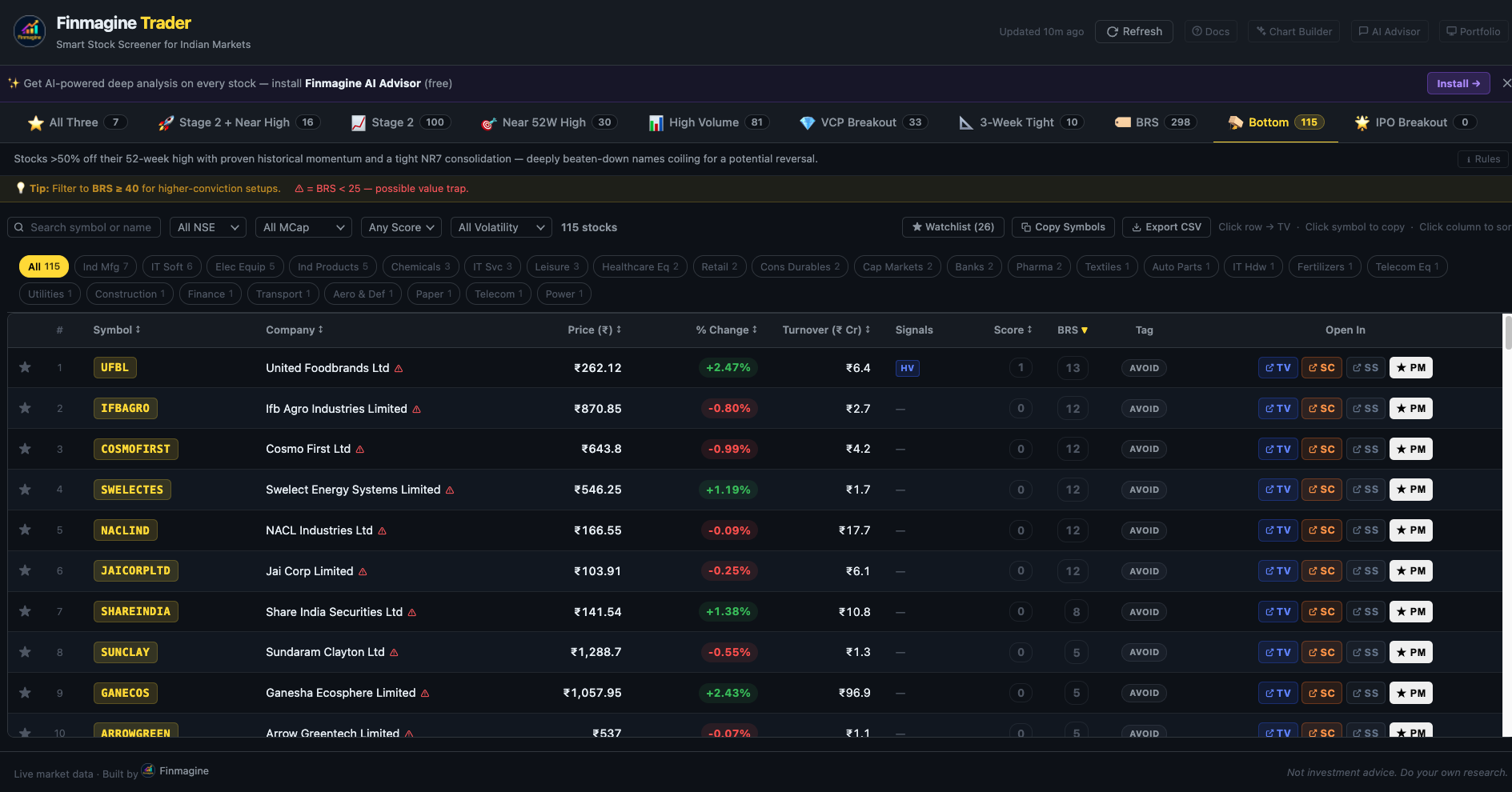
Done in v2.2.0, just submitted to CWS. Removed ADR% entirely from the Bottom scan — it was an approximation anyway and was artificially limiting results. Also took the opportunity to align
the momentum conditions more closely with your original Chartink scanner, so the tab now surfaces ~115 stocks vs the ~36 it was returning before. BRS does the filtering from here. Should be live once CWS approves (usually same day or next).

Thanks for sharing the Atlas dashboard — clean framework. The four-condition gate (ARS/SRS positive, 52W highs >5, MARS 50 positive) makes complete sense as the prerequisite before acting on anything in the Bottom tab. These are mean-reversion candidates, not momentum plays — market breadth as the entry gate is exactly right. I’ll keep this as the intended workflow for the tab.

Thanks for the kind words! On your two suggestions — both are on the AI Advisor side rather than Trader. Corporate actions (QIB allotments, warrants, rights — last 24 months) and surfacing the most significant announcements rather than just the most recent are both valid additions to the AI prompt context. Will look at incorporating these into the next AIA template update.

Appreciate the specificity — “last 6–7 months, significant ones per Screener” is actionable.

Finmagine AI Advisor v2.15.0 — April 2026 release notes

Three new standalone templates + one major enhancement to Quarterly Deep-Dive.
Written up detailed guides for each — linking below.


1. Management Credibility Score

The core problem: management sounds confident on every concall. This template
makes that testable.

Extracts every quantified forward-looking statement from 4–12 transcripts and
scores each: +1 Delivered / -1 Missed / 0 Unverifiable. Guidance Tracker
includes a Category column (Revenue / Margin / Capex / Strategic) — many
managements are reliable on revenue guidance but chronically optimistic on
capex timelines. That pattern becomes visible.

Closes with a CREDIBILITY PATTERN archetype:

  • Conservative Promiser (underpromises, overdelivers)
  • Reliable Executor (guides accurately, executes consistently)
  • Optimistic Narrator (paints a great picture, delivery lags)
  • Erratic (no discernible pattern — most dangerous)

Each archetype carries a specific investment implication.

Full guide (with example output):
Management Credibility Archetypes: Category Scoring & Pattern Recognition | Finmagine AI Advisor v2.16.0

Best with Claude.


2. Growth Triggers

Addresses a gap in standard analysis: most research describes what a company
does, not what specific events would cause the market to re-rate it.

Produces 5–7 catalysts, each with quantified ₹Cr / bps impact, timeline,
evidence source, and a conviction tag:
:blue_circle: VISIBLE — already showing in reported numbers
:yellow_circle: GUIDED — management has stated it explicitly
:green_circle: OPTIONALITY — not priced in, possible but not guided

Rule #6 enforces that the conviction tag must match evidence strength —
can’t call something VISIBLE without citing an actual.

Closes with Trigger Scoreboard: Dominant Theme, Trigger Density, Re-Rating
Probability.

How conviction tags work in practice:
Growth Triggers Conviction Tags & Trigger Scoreboard | Finmagine AI Advisor v2.16.0

Best with Gemini Deep Research or Perplexity.


3. Value Chain Analysis

Maps the full production chain from raw material to end consumer with EBIT%
benchmarks at each stage. Audits four dimensions of pricing power: input
pass-through, output pricing, chokepoint control, customer switching cost.

Tracks 3-year vertical integration trajectory (upstream / downstream /
lateral / static) and identifies 2–4 credible 10-year disruption risks
with mechanism, timeline, and current exposure level.

Chain Migration Verdict:
COMMODITY TRAP → SEMI-DIFFERENTIATED → DIFFERENTIATED → CHOKEPOINT CONTROL

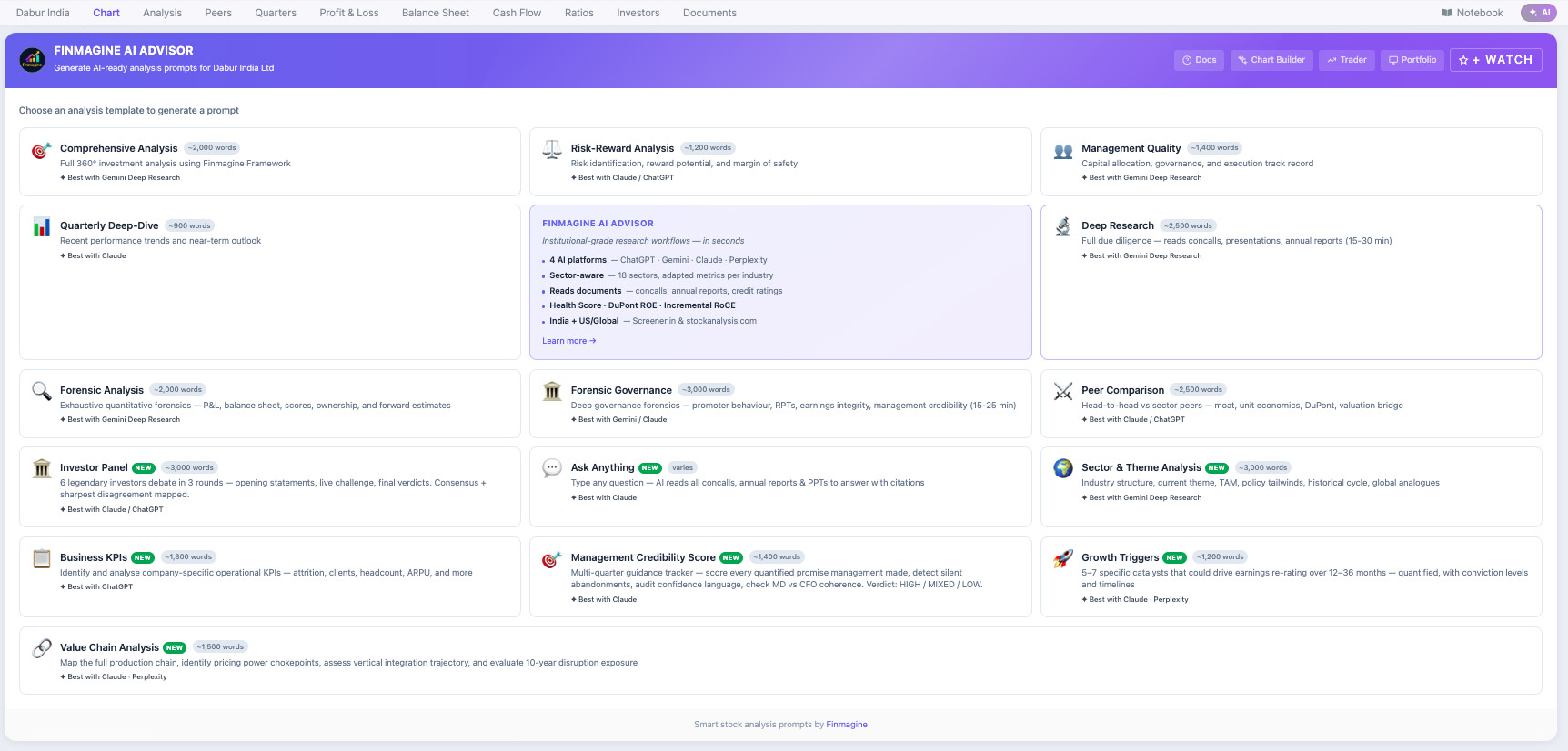
Tested on Dabur — Claude surfaced the ICRA report + Sesa Care ₹12.6Cr detail
unprompted. Full walkthrough in the guide:
Value Chain Analysis: Map Pricing Power &amp; Disruption Exposure | Finmagine AI Advisor v2.15.0

Best with Claude · Perplexity.


4. Quarterly Deep-Dive — two new sections

Section 0B: Concall Tone Signals
Confidence calibration, question deflection rate, narrative recycling score,
MD/CFO alignment → GREEN / AMBER / RED tone verdict

Section 0C: Narrative Drift
Vanishing Topics (silently dropped), New Talking Points (new spin?), Metric
Retreat (metrics previously cited, now buried)
→ Suspicious Pivot / Tactical Adjustment / Organic Evolution / None Detected

Both merged into a single Quarterly template card.


Trader integration

Finmagine Trader users: a :sparkles: AI button now appears per stock row.
Stage 2 breakout signal → Growth Triggers template in one click.
Momentum signal to fundamental catalyst question without leaving the screener.

Extension is free — would welcome feedback, especially on how the Credibility
Pattern archetype lands in practice across different management styles.

Feature Request:

Can we add a Porter’s Five Forces analysis that reviews all available documents and industry reports to identify the five forces in Indian Context as well as compare similar companies in other geography covering

  1. Threat of New Entrants
  2. Bargaining Power of Suppliers
  3. Bargaining Power of Buyers
  4. Threat of Substitutes
  5. Competitive Rivalry

And assign a score to Each of the five forces of the Company based on it and Rank all the peers that it found based on those Porter Five Scores.

Additionally, we can include a MOAT analysis, which identifies what makes it unique. What are the competitive moat and key strategic differentiators compared to peers?

@aranshah137 — great suggestion, already built and coming in a future update - the one after next!

The Sector & Theme Analysis template will include three mandatory structured outputs:

  1. Porter’s Five Forces Table (Indian context)
    All five forces scored 1–10, with India-specific drivers per force (GST formalisation, distribution moat cost, DPDP Act, OEM lock-in, etc.), Composite Score, and STRONG / MODERATE / WEAK industry structure verdict.

  2. Global Peer Porter Ranking
    5–6 peers (Indian + international) each scored on the same five forces, sorted by composite — so you see exactly where the company sits in its global structural cohort.

  3. Competitive MOAT Deep-Dive
    Five moat types assessed → WIDE / NARROW / NO MOAT verdict with durability horizon + peer moat comparison + 2×2 Investment Implication Matrix (Compounding Machine / Survival Tool / Theme Play / Avoid).

Best with Gemini Deep Research. Will drop in the next to next Chrome extension update — stay tuned!

2 Likes

I’d say everyone has their own way of analyzing a company. Apart from a few key prompts, it will be helpful if you can incorporate a base prompt that just pulls in all the necessary documents and info (we can have a short or long version depending on how many docs we’re attaching) .

So, after giving this base prompt, user can give their custom prompts/analyse the company as per his parameters. (this is for us non-tech savy people, who manually download each doc and upload it on AI. This base prompt time will save us time and make our lives easier)

Example of Base prompt : you’re studying a listed Indian company (XXX Ltd), and for now your task is just to open the links which i have given and gather/study the data. No deep analysis yet—just build a basic understanding of the business. Summarise the business activity/operations it in very short for me.I will be giving you further prompts/instructions or QNA in subsequent chats. For now, just access the documents, so we can delve into it further in subsequent chats.

This way we can paste this base prompt in new project (say in Claude), and give our custom prompts or questions later.

Trying to incorporate a lot of different prompts in this extension will make it messy and may not solve the purpose as every company and user is different. Overall, this could make the tool more flexible and useful for different types of users and workflows.

Edit : there is error in market cap. export. check that once sir

Great suggestion Naman! The accordion is now in both the web app and CWS AIA (Will be submitted to Google for review soon) — tap “:light_bulb: Not sure which templates to run?” on the template screen to see the Custom Research workflow.
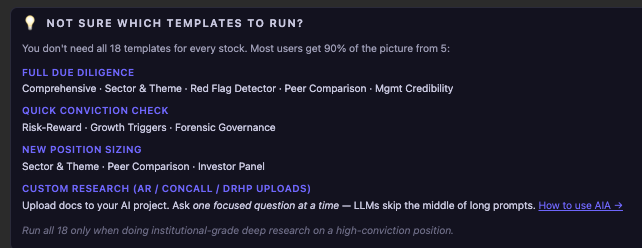
One tip that’ll make a huge difference: ask one focused question per prompt rather than one long mega-prompt. LLMs are known to pay lip service to the middle sections of a long prompt and quietly skip them. So: upload your docs to a Claude Project, then ask “What is the revenue breakdown by segment?” → get answer → “How has working capital trended over 3 years?” → get answer. Each short prompt gets full attention.

We’ve also written a full guide on how to get the most out of AIA templates with uploaded documents: How to Use the Finmagine AI Advisor | 18 Prompt Templates Explained | Finmagine :folded_hands:

Two new templates are live in Finmagine AI Advisor (v2.17.0) — both requested by the community:

:clipboard: IPO Decoder
Forensic DRHP/RHP analysis in 7 structured sections — Business Reality Check, Financial Forensics (3-year pre-IPO P&L with window-dressing flags), Promoter & Management Audit (OFS%, salary, litigation history), Use of Proceeds (growth vs exit funding), Valuation Sanity Check vs named peers, Risk Factor Triage (company-specific only, strips boilerplate), IPO Verdict (COMPELLING / WATCHLIST / APPROACH WITH CAUTION).
How to use: download DRHP/RHP from SEBI EDGAR / NSE / BSE → upload to a Claude Project → run the template.
Tutorial: Forensic IPO Analysis: How to Decode a DRHP Before the Listing | Finmagine AI Advisor

:police_car_light: Red Flag Detector
Adversarial annual report scan for any listed company. 7 sections: Earnings Quality, Balance Sheet Stress, Cash Flow Integrity, Related Party Audit (entity names + amounts + CLEAN/CONCERNING flags), Auditor Signals (tenure, qualifications, Key Audit Matters), Governance & Promoter Behaviour. Closes with Red Flag Scorecard — N/18 flags found, overall :green_circle:/:yellow_circle:/:red_circle: verdict, most critical finding, and one sharp question for the next concall.
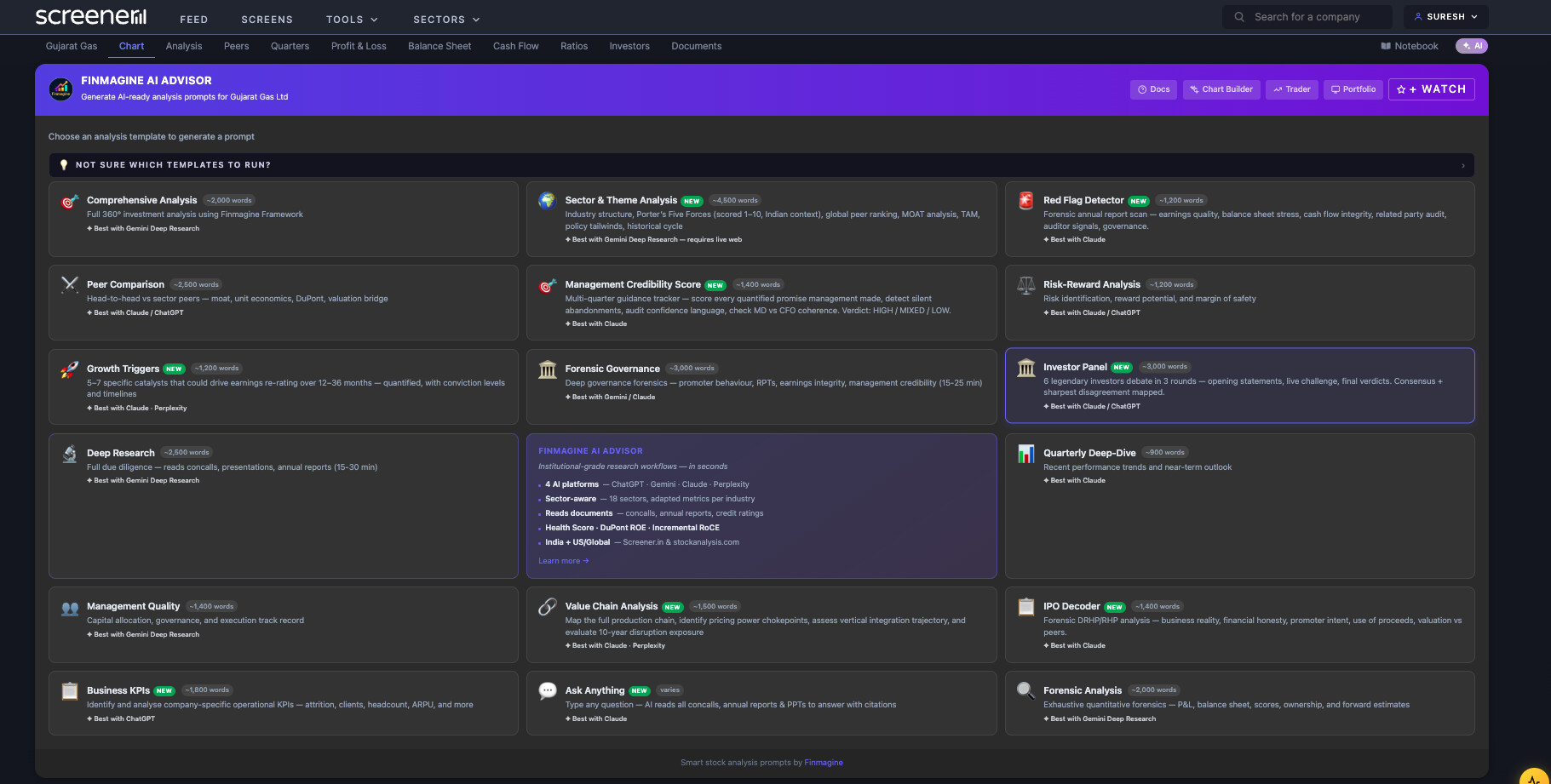
Tutorial: Red Flags Before They Become Headlines: Annual Report Forensics with AI | Finmagine AI Advisor

Also in v2.17.0: every prompt now auto-includes Corporate Actions (last 24 months) and filtered Significant Announcements (last 6–7 months, material events only — fundraising, acquisitions, CEO changes, SEBI orders).

Extension link in profile. Already installed — just reload Screener.in.

1 Like

There has been a service disruption in the “Finmagine AI Advisor – Stock & Fund Prompts” Extension overnight since about 6 hours ago with the result that no output is getting populated since.

We have submitted a Fix to the Chrome Web Store — pending their review. Will update here once it’s live.

Apologies for the disruption.

1 Like

v2.20.1 is now live on the Chrome Web Store. The blank panel issue has been fixed — please update the extension to restore full functionality. Thank you for your patience.

1 Like

v2.20.1 is now live on the Chrome Web Store. The blank panel issue observed overnight has been fixed — please update the extension to restore full functionality. Thank you for your patience.

Blank panel is gone but getting below error:
Analysis failed: this._fmtPct is not a function


Currently I’m using this icon on Finmagine ChartBuilder to jump to TradingView, but can we make a similar one in Finmagine AI Advisor? Somewhere besides Finmagine Trader Icon