[TOOL LAUNCH] Free Chrome Extension — Turn Screener.in Data into Institutional-Grade AI Research Prompts | Zero Data Collection | v2.0.0 (US Stocks + Forensic Analysis) Under Review

Hello ValuePickr community,

I’ve just launched Finmagine AI Advisor — a free Chrome extension that solves a problem every serious Screener.in user knows well: you have all the data, but turning 12 years of financial tables into a coherent investment thesis still requires the kind of structured analytical thinking that institutional teams have spent years systematizing.

The extension bridges that gap.

:link: Chrome Web Store: https://chromewebstore.google.com/detail/finmagine-ai-advisor-–-sm/gohgbkplhjbijgnnaoijnnlicbedofce
:open_book: Landing Page & Full Documentation: Finmagine AI Advisor - Free Chrome Extension for Institutional-Grade Stock Analysis on Screener.in


What It Does

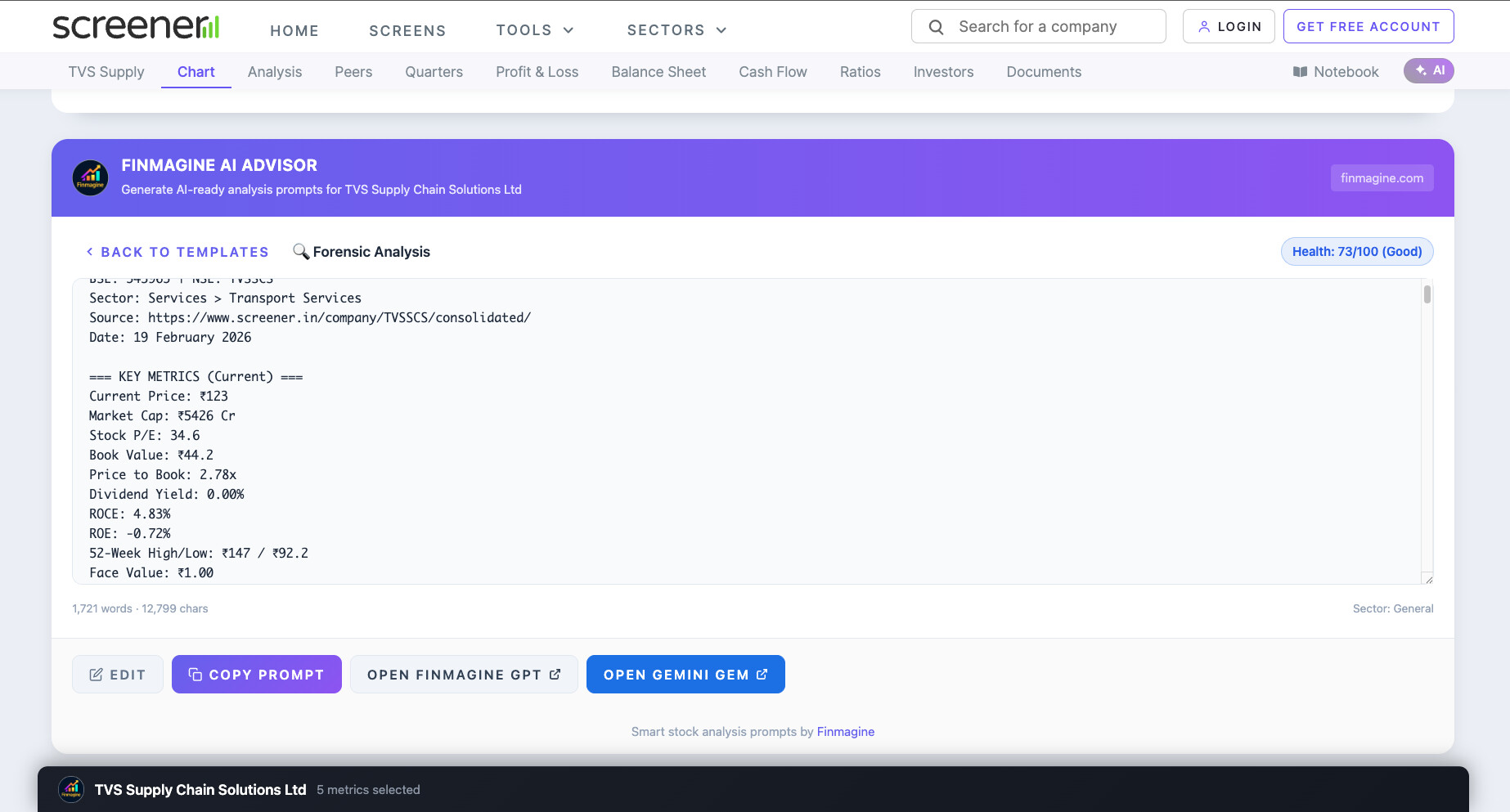
When you visit any company page on Screener.in, the Finmagine AI Advisor panel appears automatically below the chart section. It extracts everything on the page — key metrics, 6 financial tables (12 years of P&L, Balance Sheet, Cash Flow, Ratios, Shareholding, Quarterly), pros & cons, sector classification, and document links (concall transcripts, annual reports, credit ratings).

Then, with one click on a template, it:

  1. Detects the company’s sector (from the Peer Comparison breadcrumb)
  2. Runs sector-aware analysis: health score, CAGRs, DuPont ROE decomposition, valuation verdicts
  3. Assembles a ~1,800-word structured research prompt
  4. You copy → paste into the Finmagine Extension Analyst Custom GPT → receive institutional-grade research output in 2–5 minutes

The 5 Analysis Templates (India / Screener.in)

Template 1 — Comprehensive Analysis
Full 360-degree investment thesis using the Five-Parameter Weighted Scoring Framework: Financial Health (25%), Growth Prospects (25%), Competitive Position (20%), Management Quality (15%), Valuation (15%). Every parameter scored 2–10 with a weighted composite verdict.

Template 2 — Risk-Reward Analysis
Material risk identification across 5 dimensions. Probability-weighted Bull/Base/Bear return scenarios. “Cheap for a reason” detection. Margin of safety assessment.

Template 3 — Management Quality Deep-Dive
12-quarter Promise vs. Delivery tracking. Capital allocation efficiency. Governance assessment. The Management Integrity Matrix. Flags “metric shopping” red flags.

Template 4 — Quarterly Deep-Dive
Sequential quarterly trend analysis, earnings quality checks, margin trajectory, and forward guidance extraction. Answers: is quarterly momentum supporting or diverging from the annual story?

Template 5 — Deep Research (Featured)
This one goes beyond the prompt data. The GPT is instructed to browse and read actual BSE PDFs — concall transcripts, investor presentations, annual reports. It produces a 9-part forensic analysis: Sector Context → Financial Forensics → PPT Analysis (12 quarters) → Concall Transcript Analysis → Annual Report Forensics → Management Integrity Scorecard → News & Competition → Growth Triggers → Final Verdict. Takes 15–30 minutes because it actually reads the documents.


Sector-Aware Intelligence: 18 Profiles

Generic stock screeners apply the same rules to every company. The extension has 18 specialized sector profiles:

  • Banking/NBFC: NIM, GNPA, CASA, ROA — D/E skipped, negative CFO is normal, P/B is primary
  • IT Services: Skip D/E and Current Ratio; focus on employee cost ratio and deal wins
  • Pharma: Gross margin emphasis, R&D pipeline, FDA risk flags
  • Metals & Mining: EV/EBITDA primary (P/E is unreliable for cyclicals)
  • Infrastructure: Interest coverage, order book-to-revenue ratio
  • FMCG: Volume vs price-led growth distinction
  • Plus 12 more: Telecom, Utilities, Chemicals, Auto, Capital Goods, Textiles, Fintech, Real Estate, Insurance, Healthcare, Media, and a General fallback

When the extension detects the company’s sector, every downstream analysis — health score thresholds, valuation metrics, concern flags — adjusts automatically.


The Built-In Analysis Engine

Before GPT even sees the data, the extension computes:

  • Health Score (0–100): Starts at 50 (neutral). Adds/subtracts based on revenue/profit CAGR quality, ROE/ROCE levels, debt status, cash flow quality, and sector-specific metrics. Color-coded badge: Excellent → Good → Average → Below Average → Poor.
  • Multi-Horizon CAGRs: Revenue, Profit, and EPS growth at 1Y, 3Y, 5Y, 10Y.
  • DuPont ROE Decomposition: ROE = Net Profit Margin × Asset Turnover × Equity Multiplier. Reveals whether returns are driven by genuine profitability, operational efficiency, or financial leverage.
  • Valuation Verdicts: Sector-appropriate metric compared against 5-year median and peer benchmarks.
  • Strengths & Concerns: Automated identification across growth, profitability, leverage, cash flow, and shareholding dimensions.

Privacy: Zero Data Collection

This is important to me. The extension is 100% client-side. It reads visible data from the Screener.in page and generates the prompt locally in your browser. No network calls, no analytics, no tracking, no telemetry. Your financial research never leaves your machine.

Privacy policy: https://finmagine.com/chrome-extension-privacy.php


Complete India/Screener.in Deep Dive Tutorial

I’ve written a detailed 25-minute tutorial covering the complete architecture, all 5 templates, sector-aware intelligence, health scoring methodology, DuPont decomposition, and the 21-parameter scoring framework. Includes video guide, audio commentary, and 56 interactive flashcards:

:open_book: Turn Screener.in Into an Institutional-Grade AI Analyst | Finmagine AI Advisor Deep Dive


Coming Soon: v2.0.0 — US & Global Stocks (Under Google Review)

v2.0.0 extends the AI Advisor to stockanalysis.com with 4 templates for US and global stocks. It’s currently under Google’s review process and will be live within a few days.

4 US Templates:

Forensic Analysis (Featured) — A 7-part purely quantitative investigation that processes 11 pages of data per stock, including the exclusive /forecast/ page for analyst price targets and forward EPS estimates. No documents, no guesswork — just hard numbers:

  • Part 1: Financial Forensics (P&L, Balance Sheet, Cash Flow, Ratio trends)
  • Part 2: Financial Health (Altman Z-Score + Piotroski F-Score)
  • Part 3: Value Creation (ROIC vs WACC spread)
  • Part 4: Ownership Intelligence (Institutional, Insider, Short Interest)
  • Part 5: Analyst Consensus Forensics (price target spread, recommendation trends, forward EPS)
  • Part 6: Valuation Forensics (earnings yield vs 10Y Treasury)
  • Part 7: Final Verdict (Five-Parameter Score + Bull/Base/Bear)

Comes with a full Amazon (AMZN) case study — Z-Score 5.06 (Safe Zone), F-Score 5/9 (Neutral), ROIC 14.23% vs WACC 11.04% (+3.19% spread), $131.8B CapEx paradox, 85% analyst price target spread, final score 7.9/10 (Core Compounder).

Comprehensive Analysis, Risk-Reward Analysis, Quarterly Deep-Dive also available for US stocks.

v2.0.0 Tutorials:


How to Install

  1. Click the Chrome Web Store link below
  2. Click “Add to Chrome”
  3. Visit any company page on Screener.in
  4. The panel appears automatically — pick a template and go

:link: https://chromewebstore.google.com/detail/finmagine-ai-advisor-–-sm/gohgbkplhjbijgnnaoijnnlicbedofce

Works on Chrome, Edge, Brave, and Opera. Completely free. No registration, no subscription, no credit card.

Happy to answer any questions. Feedback — especially on sector-specific edge cases and template output quality — is welcome.


10 Likes

Its wonderful tool for retail investors to use , let me know do we just need to copy paste the prompt from screener to GPT

Thank you @Bhaskar_Sachin! Yes, essentially that’s exactly it — it’s designed to be as simple as possible:

  1. Visit any company page on Screener.in — the AI Advisor panel appears automatically below the chart section
  2. Click a template (e.g. Comprehensive Analysis or Deep Research)
  3. The extension extracts all the financial data and generates a structured prompt — click Copy
  4. Open the Finmagine Extension Analyst (link is right there in the panel) — it’s a free Custom GPT on ChatGPT
  5. Paste and send → full institutional-grade research output in 2–5 minutes

The one clarification: you’re not copying anything from Screener.in itself — the extension does all the data extraction invisibly in the background and hands you a ready-to-use prompt. You never have to manually copy tables or numbers.

The Deep Research template is slightly different — that one instructs the GPT to also browse and read actual BSE PDFs (concall transcripts, annual reports), so it takes 15–30 minutes and requires ChatGPT’s browsing capability
to be active.

If you’d like a walkthrough of the full workflow with screenshots, I’ve written a detailed tutorial here:
:backhand_index_pointing_right: Turn Screener.in Into an Institutional-Grade AI Analyst | Finmagine AI Advisor Deep Dive

It covers all 5 templates, a real TCS example, and includes 56 flashcards if you want to go deeper into the methodology. Happy to answer any follow-up questions!

1 Like

This is a fascinating tool yet again and a handy tool you made.

Few Questions and Feedback

  1. Will it be free forever?
  2. Will the answers from GPT be different if we have paid or free versions? of ChatGPT
  3. Can this work on Gemini if we simply copy-paste it in? If not, can you make it Possible, just like ChatGPT

@karanshah137 — great questions, all three get to the heart of how the tool actually works. Let me answer each one directly.


  1. Will it be free forever?

Yes — the Chrome extension itself is free forever, no plans to change that. It’s a prompt-generation tool that runs entirely in your browser. There’s no server infrastructure to run, no AI API calls being made, no compute
costs on my end. The extension just extracts data and assembles a text prompt — so there’s genuinely nothing to monetize.

The one honest caveat: the AI analysis quality depends on what you plug the prompt into (which brings me to your second question).


  1. Free vs. paid ChatGPT — does it make a difference?

It does, for two reasons:

The Custom GPT — the Finmagine Extension Analyst that the panel links to — requires ChatGPT Plus, because Custom GPTs are a paid feature. This matters because the Custom GPT has the Five-Parameter scoring methodology (the
Finmagine framework) pre-loaded into its knowledge base, so the output is more structured and consistent.

However, the prompts work perfectly well on free ChatGPT (or any AI). You won’t have the methodology pre-baked, but GPT can still process 12 years of financial tables and generate solid research — just with its own analytical
framework rather than Finmagine’s specific scoring structure.

Quick summary:

  • Free ChatGPT + paste prompt → Good analysis, generic framework
  • Paid ChatGPT + Custom GPT → Better analysis, Five-Parameter scoring, more consistent verdict format, and required for the Deep Research template (which needs web browsing to read BSE PDFs)

If you’re on the free tier, the Comprehensive Analysis and Risk-Reward templates will still give you substantial value.


  1. Gemini — does it work if you just paste the prompt in?

Yes, works right now without any changes needed. The prompt is just structured text — a ~1,800 word package containing all the financial data, computed metrics (health score, CAGRs, DuPont), and analytical instructions. Any
capable AI model can process it.

Gemini 2.0 Flash and Gemini Advanced both handle these prompts well in my testing. Gemini Advanced is particularly good because it also has web search, which means it can handle a version of the Deep Research workflow
(browsing concall transcripts) too.

The only difference vs. the Custom GPT: Gemini won’t have the Finmagine Five-Parameter methodology pre-loaded, so you’ll get Gemini’s own analytical framing rather than the specific scoring structure. For most use cases —
getting a quick thesis, risk assessment, or quarterly check — this doesn’t really matter.

I’ll add a “Works with Gemini / Claude / any AI” note to the documentation since it comes up — it’s a genuine strength of the tool that it’s AI-agnostic.


Good catch on all three — especially the Gemini question. The “it’s just text, paste it anywhere” aspect is actually one of the things I like most about this approach vs. tools that lock you into one AI provider.

3 Likes

Thank you for the detailed note. Can we make Finmagine Five Parameter Gemini Gems like Custom GPTs in ChatGPT? Because it will have Deep Research on Google Stack as you mentioned, it will be interesting.

@Gopalan_Suresh_Raj

Once again, you have hit the ball out of the park in uplifting the general investing community.

Some suggestions if you can implement.

1.) In few of the companies tested, it is unable to produce segmental analysis ?
And if possible, can you design the prompt in such a way that it can also give SOTP valuation for companies having multiple verticals ?

2.) I tried management quality prompt for multiple companies.
Here is what I observed.

Since DUpoint is not given in the extacted data, it is unable to calculate by itself & always produces N/A. Can the prompt be re-engineered such that it calculates DUPOINT by itself ?

Again for management quality, here it what its decision are based on.

To have better depth of the management’s commentary v/s what they had achieved earlier (Walking the Talk), instead of previous 2 concalls, can it atleast go back researching 2-3 years data & how has management fared in its commentaries ?

That would essentially provide a better depth.

These are just suggestions as I am non-technical person & dont know how much of this can be done.

Great idea @karanshah137 — it’s already done and tested!

Introducing: Finmagine Extension Analyst Gem — the Gemini equivalent of our ChatGPT Custom GPT, now live: https://gemini.google.com/gem/2b262e207590

Just ran a full Deep Research analysis on Polycab India using the extension + Gem workflow. Here’s what it produced:

Five-Parameter Score — Polycab India Ltd.

┌──────────────────────┬────────┬──────────────┬───────────────────┐
│ Parameter │ Weight │ Score (2–10) │ Weighted │
├──────────────────────┼────────┼──────────────┼───────────────────┤
│ Financial Health │ 25% │ 10 │ 2.50 │
├──────────────────────┼────────┼──────────────┼───────────────────┤
│ Growth Prospects │ 25% │ 9 │ 2.25 │
├──────────────────────┼────────┼──────────────┼───────────────────┤
│ Competitive Position │ 20% │ 10 │ 2.00 │
├──────────────────────┼────────┼──────────────┼───────────────────┤
│ Management Quality │ 20% │ 8 │ 1.60 │
├──────────────────────┼────────┼──────────────┼───────────────────┤
│ Valuation │ 10% │ 6 │ 0.60 │
├──────────────────────┼────────┼──────────────┼───────────────────┤
│ Composite │ │ │ 8.95 — Strong Buy │
└──────────────────────┴────────┴──────────────┴───────────────────┘

“An exceptional industrial-consumer hybrid with a debt-free, cash-rich balance sheet and multi-decade structural tailwinds. Core portfolio holding with a roadmap to ₹300+ billion revenue by FY30.”

The workflow (3 steps):

  1. Use the Finmagine AI Advisor extension on any Screener.in page → select Deep Research template → Copy
  2. Open the Finmagine Extension Analyst Gem → Paste → hit go
  3. Deep Research runs (~5–10 mins), browses BSE/NSE filings, concalls, annual reports live → produces a structured document with the Five-Parameter score table and an Export to Sheets button

Why it works particularly well for India stocks:

  • Reads actual BSE PDF concall transcripts and annual reports in real time — beyond what Screener shows
  • Output is a formatted document (not just a chat response) with a Contents panel
  • Google Search grounding pulls in current news, order flows, regulatory updates

Do you need Gemini Advanced? Yes — but many Jio subscribers already have Google One AI Premium included at no extra cost. Check your MyJio app under Benefits.

1 Like

Thank you @vivek_lakhani — these are excellent suggestions from a power user. Let me address each one:

  1. Segmental Analysis + SOTP Valuation

Both are doable. Screener.in does have a Segments section for companies that report segment-wise, and the extension can be updated to extract that data. For SOTP — this is the interesting one. For conglomerates (Bajaj
Finserv, ITC, L&T, Mahindra, etc.), a Sum-of-the-Parts valuation requires segment revenue/EBIT and sector-appropriate multiples. Plan:

  • Extract segment data where available on Screener
  • Add a SOTP section to the Comprehensive template when multiple segments are detected
  • Caveat: quality depends on how granularly the company discloses — some only report 2 broad segments
  1. DuPont — computing it from available data

You’re right that DuPont isn’t in Screener’s output directly, but all three components are already in the extracted data:

  • Net Profit Margin = PAT ÷ Revenue ✓
  • Asset Turnover = Revenue ÷ Total Assets ✓
  • Equity Multiplier = Total Assets ÷ Shareholders’ Equity ✓

So DuPont = Margin × Turnover × Leverage — fully calculable from what’s already there. I’ll add this as a pre-computed metric in the next update so it’s never N/A again.

  1. Management Commentary — 2-3 years of concalls

The links for ALL historical concalls are already extracted by the extension (Screener lists 3-4 years of them). The current Management Quality prompt only asks for “most recent 2-4” — a simple but high-impact prompt change.
I’ll update it to:

  • Read concalls going back 2-3 years systematically
  • Cross-reference guidance given vs actual results delivered year by year
  • Flag consistent under/over-promise patterns

This “Walking the Talk” scorecard is one of the most powerful things Deep Research can do — reading 8-10 concall PDFs and building a guidance credibility track record over multiple cycles. It’s a genuinely differentiated
output vs anything a brokerage report typically provides.

All three on the roadmap for the next update. Keep the feedback coming — this is exactly the kind of depth that makes the tool better for serious fundamental research.

3 Likes

Showing This

Yes, for sure. :+1:

Please try:
for Gemini Gems URL:

And tell me if it works for you

1 Like

Yes, it’s working. But I have to save this link instead. Can we have an option besides Open Finmagine GPT? Which Directly takes to Gemini Gem instead to find this link everytime

Another question: how is this health calculated?

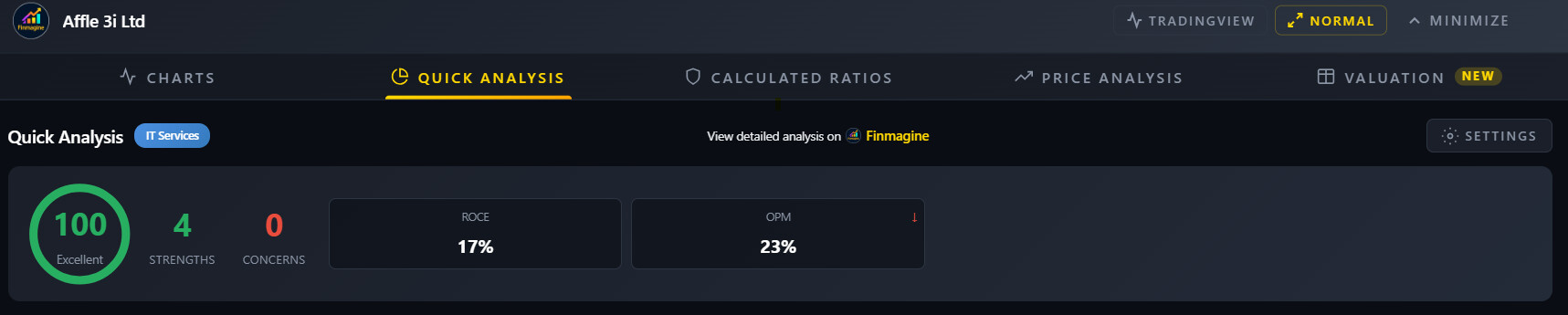
Can we Keep this health score in Quick Analysis?

@karanshah137 — Yes, already done!

v2.0.0 of the AI Advisor extension (currently under review in the Chrome Web
Store) has an “Open Gemini Gem” button right next to the “Open Finmagine GPT”
button. One click directly opens the Gem — no need to save or search for the link.

Should be live within a few days once the review completes. Will update this
thread when it’s published!

1 Like

@karanshah137 — great questions!

How is the health score calculated?

The health score (0–100) is a sector-aware composite that uses the same analysis engine in both the AI Advisor and the Chart Builder:

  • Starts at 50 (neutral baseline)
  • +5 per strength identified (strong ROCE, consistent CFO, low debt, etc.)
  • –7 per concern identified (declining margins, high debt, negative FCF, etc.)
  • Bonus points for hitting sector-specific thresholds:
    • Revenue & Profit CAGR meeting targets (+8 each)
    • ROE above threshold (+10), ROCE above threshold (+8)
    • Multiple years of positive CFO (+10), positive FCF (+5)
    • Zero debt (+10) or manageable debt (+5)
    • For US stocks: Altman Z-Score, Piotroski F-Score, ROIC vs WACC spread

Thresholds are sector-specific — a bank is judged by NPA ratios and NIM, not by D/E ratio. An FMCG company is judged by ROCE and margin consistency, etc.

Labels: Excellent (≥80) | Good (≥65) | Average (≥50) | Below Average (≥35) | Poor (<35)


“Can we keep this health score in Quick Analysis?”

Good news — it’s already there! In the Chart Builder, click the Quick Analysis tab and you’ll see the health score circle at the top right of the analysis panel. Same score, same algorithm.

The AI Advisor shows it in the panel header as a quick summary before the full prompt. The Chart Builder shows it inside the Quick Analysis tab with a full breakdown of strengths and concerns below it.

Hope that helps!

1 Like

Yes, this helps a lot. Was thinking, can we screen stocks based on the Finmagine Health Score? And sort companies based on it and give rankings to it?

@karanshah137 — love the idea, but there’s an important architectural distinction worth explaining:

Why the extension can’t screen/rank stocks

The extension runs on the stock page you’re currently browsing — it reads financial data from that single page and computes the health score for that company on the fly. It has no backend, no database of stored scores, and no
cross-company memory. So building a screener or ranking table inside the extension isn’t feasible with the current architecture.

But Finmagine already has a ranking system!

The health score in the extension is a quick per-stock diagnostic. For actual rankings across companies, Finmagine’s platform has a far more rigorous Four-Phase Ranking Framework:

  • Phase 1 — Deep forensic analysis across 18 dimensions (sector dynamics, management integrity, financial forensics)
  • Phase 2 — Weighted scoring: Financial Health, Growth Prospects, Competitive Position, Management Quality, Valuation
  • Phase 3 — Dynamic discriminatory ranking with percentile normalization
  • Phase 4 — Consensus aggregation using Borda Count, WSUM, and Markov Chain methods

You can read the full methodology here: Finmagine™ Four-Phase Stock Analysis and Ranking Framework

And see the actual rankings here: Company Rankings (Ranks 21-40) - Finmagine Professional Analysis

The extension’s health score is essentially a lightweight, instant version of Phase 2 — great for a quick gut-check when you’re already researching a stock. The platform rankings are the full picture for cross-company
comparison and stock screening.

1 Like

I’m presently using my iPad for research and I’m unable to gain access to the extension. Thank you for your help in advance

Hi @rahul_raykar — this is a platform limitation with Google Chrome itself, not specific to this extension. Chrome extensions are not supported on any mobile device — neither Android nor iOS/iPadOS.

Google has confirmed this officially in their own support forums:

“Chrome extensions is only supported for the Chrome desktop web browser. And not for iOS and Android.”
Using Chrome Extensions on iPad/iPhone? - Google Chrome Community

To use the Finmagine AI Advisor, you’ll need a desktop or laptop running Chrome (or any Chromium-based browser — Edge, Brave, Opera) on Windows, macOS, Linux, or ChromeOS.

We’ve put together a full reference page with the technical reasons (WebKit engine restrictions on iOS, missing extension API on Android) and 12 cited sources if you’d like to dig deeper:
Do Chrome Extensions Work on Mobile? Android & iOS — Official Reference | Finmagine

@karanshah137 Adding more to what was discussed,

On the health score calculation:

Full breakdown with examples here:
Instant Stock Health Check: Analyze Any Company's Financial Strength in Seconds | Finmagine

Quick summary of the mechanism:

  • Starts at 50 (neutral baseline)
  • +5 for each strength detected (strong ROCE, consistent CFO, low debt, etc.)
  • −7 for each concern detected (declining margins, high debt, negative FCF, etc.)
  • Bonus points for clearing sector-specific thresholds: Revenue CAGR (+8), Profit CAGR (+8), ROE above threshold (+10), ROCE above threshold (+8), multiple years positive CFO (+10), positive FCF (+5), zero debt (+10)
  • All thresholds are sector-aware — a bank isn’t penalised for high leverage; an NBFC isn’t flagged for negative CFO because cash is raw material for lending

The tutorial covers the exact scoring tables, sector-specific rules for 18 industries, the CAGR trend analysis, and how to customise thresholds to match your investment style.

2 Likes

Hi ValuePickr community,

I’ve been building Finmagine AI Advisor, a Chrome extension that extracts financial data from Screener.in and stockanalysis.com, runs sector-aware analysis (health score, DuPont ROE breakdown, valuation verdicts), and
generates a structured ~3,800-word prompt ready to paste into ChatGPT or Gemini.

v2.0.0 — US & Global Stocks Just got Approved and Released!

First-time support for US stocks via stockanalysis.com. The extension pulls:

  • 5 years of annual + quarterly P&L, Balance Sheet, Cash Flow
  • Altman Z-Score (bankruptcy risk assessment)
  • Piotroski F-Score (financial strength, 0-9)
  • ROIC-WACC spread (is the business creating value?)
  • Analyst consensus (Buy/Hold/Sell distribution + price target spread)
  • Institutional, insider ownership and short interest
  • 145 GICS industry classifications with sector-adjusted thresholds

Tested on Amazon — Health Score 93/100 (Excellent), prompt is 3,800 words / 19,600 chars.

v2.1.0 Updates (Under Google Review) and its Gemini Gem support
Added a Finmagine Extension Analyst Gemini Gem alongside the ChatGPT option. Gem defaults to Deep Research mode, which works well for digging into annual reports and filings.

Tutorials:

For Indian stocks, the extension works on Screener.in with 5 templates: Comprehensive, Risk-Reward, Management Quality, Quarterly, and Deep Research (instructs AI to browse BSE PDFs directly).

What’s coming: Google Finance support, DuPont analysis template, ESG template, Chart Builder integration.

Free, no account, zero data collection. All processing runs locally in your browser.

Install: https://chromewebstore.google.com/detail/finmagine-ai-advisor-–-sm/gohgbkplhjbijgnnaoijnnlicbedofce
Details: Finmagine AI Advisor - Free Chrome Extension for Institutional-Grade Stock Analysis on Screener.in

Would love feedback from this community — especially on the Indian stock templates since many of you follow Screener.in closely.